2.3 编写 SIMT kernel
来源:《CUDA Programming Guide》13.4.2,书内第 47–74 页相关内容。正文为中文,常用 CUDA 与 memory 术语保留英文;代码保留原文,恢复 PDF 断行与缩进。
针对一个给定问题,CUDA kernel 的写法大体上可以与传统 CPU 代码相似,但 GPU 的一些专有特性可以用来提升性能。理解 thread 如何调度、如何访问 memory、执行如何推进,有助于充分利用计算资源。
本节进一步介绍 C++ 和 Python 中使用 SIMT 编程模型编写 kernel 的方法。
2.3.1 SIMT 基础
从开发者角度看,CUDA thread 是基本并行单元。warp 与 SIMT 介绍基本模型,SIMT Execution Model 提供更多细节。
SIMT 允许每个 thread 保持自己的状态和控制流。从功能上说,各 thread 可以执行不同代码路径;但尽量减少同一 warp 内 thread 走向不同分支的情况,往往可以显著提高性能。
2.3.2 thread 层级
thread 组成 block,block 组成 grid。grid 和 block 都可以为一维、二维或三维。kernel 使用内置变量读取维度与索引,从而计算每个 thread 的唯一全局索引,让它读写指定 global memory 数据,或在需要时执行不同代码路径。
| 含义 | C++ | Python |
|---|---|---|
| grid 各维度大小,对所有 thread 相同 | gridDim.x/y/z | cuda.gridDim.x/y/z |
| block 各维度大小,对所有 thread 相同 | blockDim.x/y/z | cuda.blockDim.x/y/z |
| block 在 grid 中的索引 | blockIdx.x/y/z | cuda.blockIdx.x/y/z |
| thread 在 block 中的索引 | threadIdx.x/y/z | cuda.threadIdx.x/y/z |
多维组织主要用于方便数据映射,维数本身不会改变性能。block 中的 thread 按可预测的顺序线性化:x 变化最快,其次是 y,最后是 z。相邻 threadIdx.x 对应相邻 thread;threadIdx.y 的步长为 blockDim.x,threadIdx.z 的步长为 blockDim.x * blockDim.y。这决定了 thread 如何分配到 warp,见 Hardware Multithreading。
图 11 展示二维 grid 与一维 block。
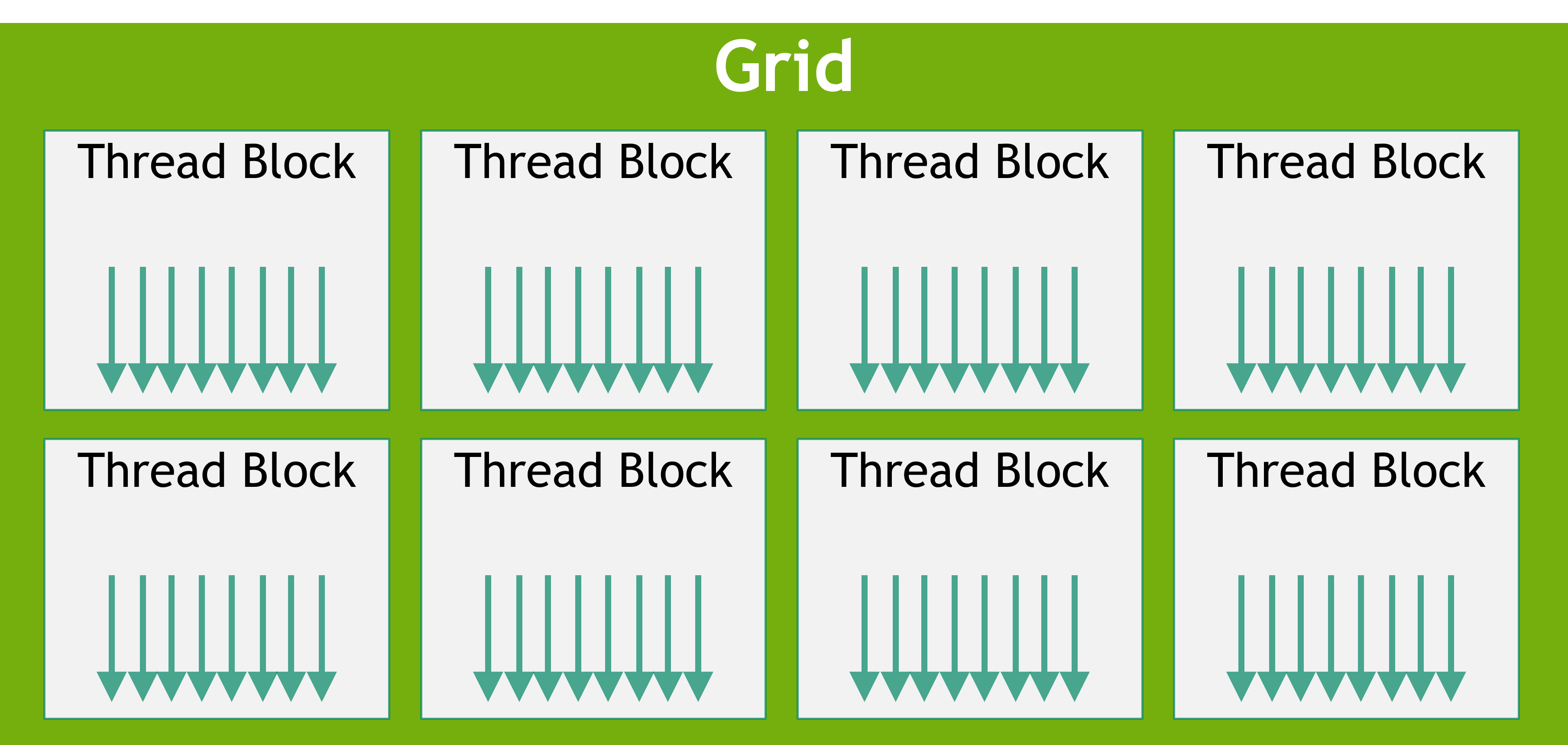
图 11:Grid of Thread Blocks。
2.3.2.1 block 同步
前面的示例不需要 block 内同步。当多个 thread 协作或访问相同 memory 地址,特别是 shared memory 时,需要同步避免数据竞争和访问冲突。
block 内最基本的同步操作是 syncthreads,C++ 中写为 __syncthreads(),Python 中写为 cuda.syncthreads()。具体用法见 Shared Memory。
2.3.3 GPU device memory space
CUDA device 提供多种可供 kernel 内 thread 访问的 memory space。下表列出常用类型、作用范围、生命周期与物理位置,随后逐一介绍。
表 1:memory 类型、作用范围与生命周期。
| memory 类型 | 作用范围 | 生命周期 | 物理位置 |
|---|---|---|---|
| global memory | grid | 应用程序 | device |
| constant memory | grid | 应用程序 | device |
| shared memory | block | kernel | SM |
| local memory | thread | kernel | device |
| register | thread | kernel | SM |
2.3.3.1 Global Memory
Global memory,也称 device memory,是保存所有 kernel thread 均可访问数据的主要空间,类似 CPU 系统中的 RAM。GPU kernel 可以直接访问它,就像 CPU 代码访问 system memory 一样。
Global memory 具有持久性:分配区域及其中的数据会保留到显式释放或应用程序终止;cudaDeviceReset 也会释放全部分配。
使用 cudaMalloc、cudaMallocManaged 等 API 分配,用 cudaMemcpy 等 API 将 CPU 数据复制进去,用 cudaFree 释放。
通常在 launch 前分配并初始化;kernel 执行时读取输入、写回结果;kernel 完成后,结果可以复制到 host,或继续供其他 GPU kernel 使用。
由于 grid 内所有 thread 都可访问 global memory,必须避免数据竞争。从 host 启动的 kernel 返回类型为 void,因此数值计算结果需要先写入 global memory,才能返回 host。
下面的向量加法中,A、B、C 都位于 global memory。
C++:
__global__ void vecAdd(float* A, float* B, float* C, int vectorLength)
{
    int workIndex = threadIdx.x + blockIdx.x*blockDim.x;
    if(workIndex < vectorLength)
    {
        C[workIndex] = A[workIndex] + B[workIndex];
    }
}
Python:
@cuda.jit
def vecadd(A, B, C):
    work_index = cuda.grid(1)
    C[work_index] = A[work_index] + B[work_index]
2.3.3.2 Shared Memory
Shared memory 可由同一个 block 的所有 thread 访问,物理上位于各 SM,并与 L1 cache 共用 unified data cache 资源。它在 kernel 执行期间存活,可以理解为由用户管理的临时工作区。容量比 global memory 小,但由于位于 SM 内,通常具有更高带宽和更低延迟。
共享访问需要避免数据竞争。C++ 的 __syncthreads() 与 Python 的 cuda.syncthreads() 会等待 block 中所有 thread 到达同步点,再继续执行。
C++:
// assuming blockDim.x is 128
__global__ void example_syncthreads(int* input_data, int* output_data)
{
    __shared__ int shared_data[128];
    shared_data[threadIdx.x] = input_data[blockDim.x*blockIdx.x + threadIdx.x];
    // All threads synchronize, guaranteeing all writes to 'shared_data' are ordered
    // before any thread is unblocked from '__syncthreads()':
    __syncthreads();
    // A single thread safely reads 'shared_data':
    if (threadIdx.x == 0) {
        float sum = 0;
        for (int i = 0; i < blockDim.x; ++i) {
            sum += shared_data[i];
        }
        output_data[blockIdx.x] = sum;
    }
}
Python:
import numpy as np
from numba import cuda
import cupy as cp
@cuda.jit
def example_syncthreads(input_data, output_data):
    shared_data = cuda.shared.array(shape=128, dtype=np.int32)
    shared_data[cuda.threadIdx.x] = input_data[cuda.blockIdx.x*cuda.blockDim.x + cuda.threadIdx.x]
    cuda.syncthreads()
    if cuda.threadIdx.x == 0:
        sum = 0.0
        for x in shared_data:
            sum = sum + x
        output_data[cuda.blockIdx.x] = sum
Shared memory 大小依赖 GPU 架构。它与 L1 cache 共用物理空间,因此增加 shared memory 使用量会减少可用 L1 cache;不使用 shared memory 时,该资源可用于 L1 cache。
通过 cudaGetDeviceProperties 查询 cudaDeviceProp.sharedMemPerMultiprocessor 和 cudaDeviceProp.sharedMemPerBlock,分别获取每个 SM、每个 block 的限制。
cudaFuncSetCacheConfig 可表达更偏向 shared memory 还是 L1 cache 的配置偏好,但不保证被遵循。runtime 可以根据资源和 kernel 需求自行决定。Shared memory 支持静态和动态分配。
2.3.3.2.1 静态分配 shared memory
C++ 在 kernel 内使用 __shared__ 声明,Python 使用 cuda.shared.array()。这种数组在 kernel 执行期间存活,其大小必须在编译时确定。下面声明 1024 个 float 元素。
C++:
__shared__ float sharedArray[1024];Python:
from numba import cuda
import numpy as np
shared_array = cuda.shared.array(shape=1024, dtype=np.float32)
声明后,block 内所有 thread 都可访问该数组。
2.3.3.2.2 动态分配 shared memory
C++ 在 launch 的第三个可选参数中指定每个 block 的动态 shared memory 字节数,例如 functionName<<<grid, block, sharedMemoryBytes>>>();省略时默认为 0。
原文 Python 示例通过 cuda.core.launch() 启动,并在 cuda.core.LaunchConfig 的 shmem_size 字段中指定相同信息。
kernel 内,C++ 使用 extern __shared__ 与空数组维度 [] 声明;Python 仍使用 cuda.shared.array(),但将 shape 设为 0。
C++:
extern __shared__ float sharedArray[];Python:
from numba import cuda
import numpy as np
## setting shape=0 indicates that this array will be dynamically sized by the kernel launch's execution configuration
shared_array = cuda.shared.array(shape=0, type=np.float32)
一个 kernel 的动态 shared memory 实际来自同一块分配。如果需要多个动态数组,应分配足够大的区域,再手工划分。例如,要得到与以下静态声明等价的数组:
short array0[128];
float array1[64];
int array2[256];
可以动态划分为:
extern __shared__ float array[];
short* array0 = (short*)array;
float* array1 = (float*)&array0[128];
int* array2 = (int*)&array1[64];
指针必须满足目标类型的对齐要求。下面的 array1 没有满足 4 字节对齐,因此不能正常使用:
extern __shared__ float array[];
short* array0 = (short*)array;
float* array1 = (float*)&array0[127];
Python 没有这种指针操作,因此不能直接使用上述 type punning 方法。
2.3.3.3 Register
Register 位于 SM,作用范围是单个 thread,由编译器管理,用于 kernel 执行期间的 thread-local 存储。通过 device 属性 regsPerMultiprocessor、regsPerBlock 查询 SM 和 block 的 register 限制。
NVCC 的 -maxrregcount 可以限制 kernel 使用的 register 数量。减少 register 使用量,可能使同一 SM 同时运行更多 block,也可能导致更多 register spilling:为了给其他值腾出空间,将 register 中的数据写入 device memory,之后再读回来。
2.3.3.4 Local Memory
Local memory 与 register 一样由编译器管理,逻辑上属于单个 thread,但物理上位于 device memory。这里的 “local” 表示作用范围,而不是物理位置。
编译器通常将以下自动变量放入 local memory:
- 无法确定使用常量索引访问的数组。
- 占用 register 过多的大型结构体或数组。
- register 不足而发生 spilling 的变量。
由于位于 device memory,其延迟、带宽与 global memory 类似,也需要考虑 合并访问。不过 local memory 的组织方式让相邻 thread ID 访问的对应 32-bit word 连续排列,因此只要 warp 中所有 thread 访问相同的相对地址,例如各自数组的同一索引或结构体的同一成员,就能实现完全合并访问。
2.3.3.5 Constant Memory
Constant memory 具有 grid 范围,位于 device,对 kernel 只读。C++ 在函数外使用 __constant__ 声明变量或数组;Python 在 kernel 内调用 numba.cuda.const.array_like(ary),创建保存 host 数组 ary 数据的 constant memory 数组。
这种变量具有以下特点:
- 位于 constant memory space。
- 每个 device 有各自独立的对象。
- 可由 grid 内所有 thread 访问;C++ host 还可通过
cudaGetSymbolAddress()、cudaGetSymbolSize()、cudaMemcpyToSymbol()、cudaMemcpyFromSymbol()访问相关符号。
C++ 中生命周期与创建它的 context 相同;Python 中生命周期与声明它的 kernel 关联。总容量可用 totalConstMem 查询,通常每个 device 为 64 KB,适合少量、各 thread 都只读的数据。
C++:
// In your .cu file
__constant__ float coeffs[4];
__global__ void compute(float *out) {
    int idx = threadIdx.x;
    out[idx] = coeffs[0] * idx + coeffs[1];
}
// In your host code
float h_coeffs[4] = {1.0f, 2.0f, 3.0f, 4.0f};
cudaMemcpyToSymbol(coeffs, h_coeffs, sizeof(h_coeffs));
compute<<<1, 10>>>(device_out);
Python:
from numba import cuda
import numpy as np
host_array = np.zeros(128, dtype=np.float32)
## fill host_array with other data
@cuda.jit
def kernel(args):
    ...
    const_array = cuda.const.array_like(a)
    # this access now goes through constant memory
    a = const_array[cuda.threadIdx.x]
2.3.3.6 Cache
GPU 具有多级 cache,包括 L2 与 L1。L2 由所有 SM 共享,容量通过 cudaGetDeviceProperties 返回的 l2CacheSize 查询。
如 Shared Memory 所述,L1 位于各 SM,与 shared memory 共用物理空间。不使用 shared memory 时,该资源可供 L1 使用。
开发者可以通过接口指定不同 cache 行为,详见 配置 L1/shared memory 平衡、L2 Cache Control、底层 load/store 函数。不提供提示时,编译器和 runtime 也会尽量高效使用 cache。
2.3.3.7 Texture Memory 与 Surface Memory
注意
旧 CUDA 代码可能使用 texture memory,因为早期 GPU 在部分场景下能从中获得性能收益。在本版指南支持的 GPU 上,普通 load/store 已可处理这些场景;对非纹理数据使用 texture、surface 指令不再带来性能优势。
GPU 可以具有专门从图像读取纹理数据、用于三维渲染的指令。CUDA 的 texture object API 与 surface object API 暴露了这些指令及相关机制。
对于普通非图形计算,这两种 memory 不提供性能优势;但在读取渲染用纹理或 surface 时仍然有用。例如 NVIDIA OptiX 使用 CUDA 作为 shader 语言,可以用这些 API 编写 hit shader。
维护仍将这些 API 用于普通数据读取的旧代码时,可查阅旧版 CUDA C++ Programming Guide。
2.3.3.8 Distributed Shared Memory
注意
Distributed shared memory 配合 thread block cluster 使用。原文所述 cooperative_groups API 在本版中仅用于 C++。
从 CC 9.0 开始,Cooperative Groups 支持 cluster 中的 thread 访问所有成员 block 的 shared memory。这种分区式 shared memory 称为 distributed shared memory,对应地址空间也使用该名称。
cluster 内 thread 可以读取、写入或原子访问其中任意地址,无论地址属于本 block 还是远程 block。静态、动态 shared memory 的声明大小仍然以每个 block 为单位;distributed shared memory 总量为 cluster 中 block 数量乘以每个 block 的 shared memory 大小。
访问前必须保证所有相关 block 都已存在,可用 cluster_group 的 cluster.sync() 确保全部开始执行。还必须确保所有远程访问在目标 block 退出前完成;例如,其他 block 尚未读完自己的 shared memory 时,不能先退出。
以直方图为例:传统方法在各 block 的 shared memory 中统计,再用 global memory atomic 合并。但当 bin 数量超过单个 block 的 shared memory 容量时,通常只能直接使用 global memory。Distributed shared memory 增加了中间层,可以按 bin 大小选择 shared、distributed shared 或 global memory。
下面根据直方图大小,在 shared memory 或 distributed shared memory 中统计。
#include <cooperative_groups.h>
// Distributed Shared memory histogram kernel
__global__ void clusterHist_kernel(int *bins, const int nbins, const int bins_per_block, const int *__restrict__ input,
                                    size_t array_size)
{
    extern __shared__ int smem[];
    namespace cg = cooperative_groups;
    int tid = cg::this_grid().thread_rank();
    // Cluster initialization, size and calculating local bin offsets.
    cg::cluster_group cluster = cg::this_cluster();
    unsigned int clusterBlockRank = cluster.block_rank();
    int cluster_size = cluster.dim_blocks().x;
    for (int i = threadIdx.x; i < bins_per_block; i += blockDim.x)
    {
    smem[i] = 0; //Initialize shared memory histogram to zeros
    }
    // cluster synchronization ensures that shared memory is initialized to zero in
    // all thread blocks in the cluster. It also ensures that all thread blocks
    // have started executing and they exist concurrently.
    cluster.sync();
    for (int i = tid; i < array_size; i += blockDim.x * gridDim.x)
    {
    int ldata = input[i];
    //Find the right histogram bin.
    int binid = ldata;
    if (ldata < 0)
        binid = 0;
    else if (ldata >= nbins)
        binid = nbins - 1;
    //Find destination block rank and offset for computing
    //distributed shared memory histogram
    int dst_block_rank = (int)(binid / bins_per_block);
    int dst_offset = binid % bins_per_block;
    //Pointer to target block shared memory
    int *dst_smem = cluster.map_shared_rank(smem, dst_block_rank);
    //Perform atomic update of the histogram bin
    atomicAdd(dst_smem + dst_offset, 1);
    }
    // cluster synchronization is required to ensure all distributed shared
    // memory operations are completed and no thread block exits while
    // other thread blocks are still accessing distributed shared memory
    cluster.sync();
    // Perform global memory histogram, using the local distributed memory histogram
    int *lbins = bins + cluster.block_rank() * bins_per_block;
    for (int i = threadIdx.x; i < bins_per_block; i += blockDim.x)
    {
    atomicAdd(&lbins[i], smem[i]);
    }
}
launch 时可按所需 distributed shared memory 选择 cluster 大小。若直方图能放入单个 block 的 shared memory,cluster 大小可以为 1。下面按需求动态启动:
// Launch via extensible launch
{
    cudaLaunchConfig_t config = {0};
    config.gridDim = array_size / threads_per_block;
    config.blockDim = threads_per_block;
    // cluster_size depends on the histogram size.
    // ( cluster_size == 1 ) implies no distributed shared memory, just thread block local shared memory
    int cluster_size = 2; // size 2 is an example here
    int nbins_per_block = nbins / cluster_size;
    //dynamic shared memory size is per block.
    //Distributed shared memory size = cluster_size * nbins_per_block * sizeof(int)
    config.dynamicSmemBytes = nbins_per_block * sizeof(int);
    CUDA_CHECK(::cudaFuncSetAttribute((void *)clusterHist_kernel, cudaFuncAttributeMaxDynamicSharedMemorySize, config.dynamicSmemBytes));
    cudaLaunchAttribute attribute[1];
    attribute[0].id = cudaLaunchAttributeClusterDimension;
    attribute[0].val.clusterDim.x = cluster_size;
    attribute[0].val.clusterDim.y = 1;
    attribute[0].val.clusterDim.z = 1;
    config.numAttrs = 1;
    config.attrs = attribute;
    cudaLaunchKernelEx(&config, clusterHist_kernel, bins, nbins, nbins_per_block, input, array_size);
}
2.3.4 memory 性能
正确使用 memory 是高性能 kernel 的关键。下面介绍提高 global memory 和 shared memory 吞吐量的基本原则,并通过逐步优化矩阵转置 kernel 演示。
多数 kernel 的性能首先受 global memory 访问影响。Shared memory 常用于让 thread 处理由其他 thread 加载或创建的数据,因此也必须理解其访问特性。
2.3.4.1 Global Memory 合并访问
Global memory 通过 32 字节 transaction 访问。当 warp 的 thread 请求数据时,硬件根据访问字长及地址分布,将这些请求合并为满足需求所需的 transaction。
即使一个 thread 只读 4 字节,相关 transaction 仍传输 32 字节。若 warp 中其他 thread 能使用该 transaction 中的其他数据,就可以提高传输利用率。
例如,相邻 thread 读取相邻的 4 字节 word 时,一个 warp 共请求 128 字节,可通过四次 32 字节 transaction 完成,利用率为 100%,见图 12。
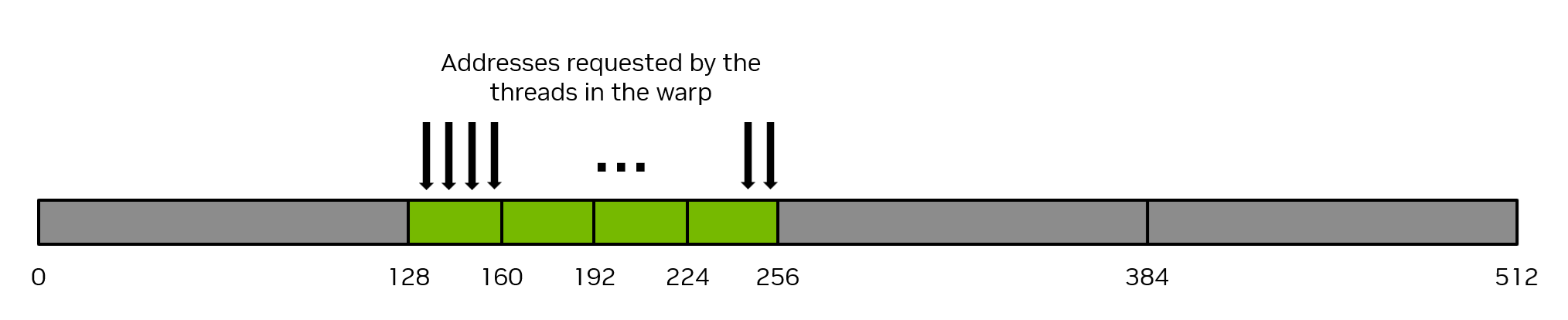
图 12:合并 memory 访问。
最差的情况之一是相邻 thread 访问的数据地址相距至少 32 字节,此时每个 thread 都需要一个独立 transaction。整个 warp 传输 32 × 32 = 1024 字节,实际只使用 32 × 4 = 128 字节,利用率为 128 / 1024 = 12.5%,见图 13。

图 13:非合并 memory 访问。
最直接的合并方式,是让相邻 thread 访问连续元素。前面的一维向量加法就符合这一模式,连续的 workIndex 对应数组连续元素。
C++:
__global__ void vecAdd(float* A, float* B, float* C, int vectorLength)
{
    int workIndex = threadIdx.x + blockIdx.x*blockDim.x;
    if(workIndex < vectorLength)
    {
        C[workIndex] = A[workIndex] + B[workIndex];
    }
}
Python:
## Defines a CUDA kernel to perform C = A + B vector addition
@cuda.jit
def vecadd(A, B, C):
    work_index = cuda.grid(1)
    C[work_index] = A[work_index] + B[work_index]
不过连续 thread 访问连续元素并不是必要条件;只要访问地址仍落在相同的一组 32 字节段内,重新排列 thread 与地址的对应关系也可以实现合并。关键是最大化“实际使用字节数 / 实际传输字节数”。
另一种理解方法,是数一个 warp 的一次 load 指令为满足 32 个地址请求,需要多少 transaction。最好情况下可能只需一次;32 个不同的 4 字节元素完全合并时需要四次;最差可能需要 32 次。通常所需 transaction 越少越好。
性能要点
保证 global memory 正确合并访问,是编写高性能 CUDA kernel 最重要的考虑因素之一。
2.3.4.1.1 使用 Global Memory 的矩阵转置
考虑非原地转置一个 N × N 的 32-bit 浮点方阵,从 a 写入 c。使用二维 grid,每个 block 为 32 × 32 个 thread,处理一个 32 × 32 的 tile。每个 thread 处理独立元素,无需显式同步。
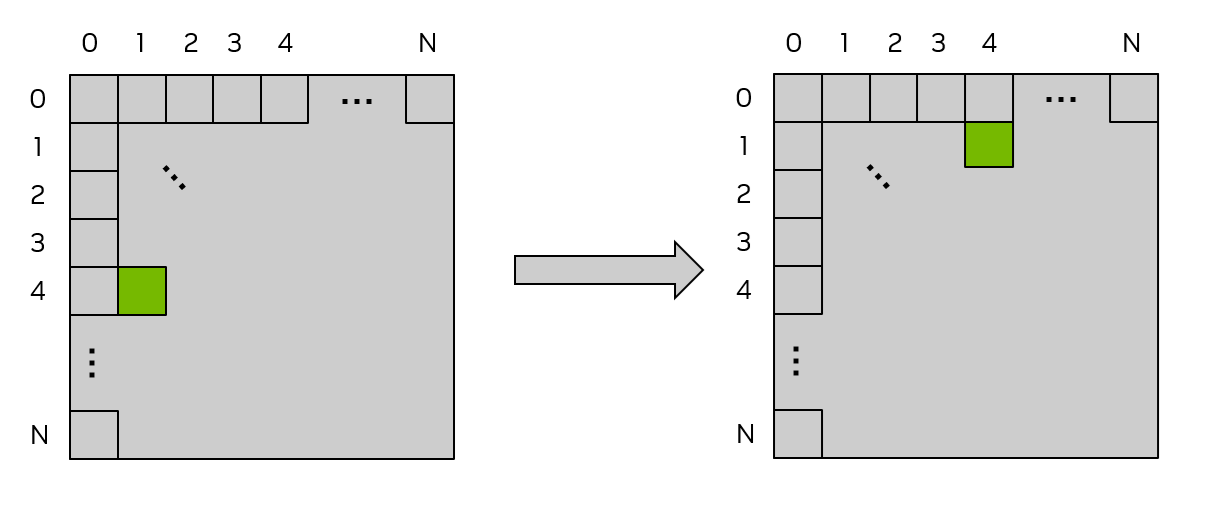
图 14:使用 global memory 的矩阵转置。
图中上方、左侧标签为二维 block 索引,也可以看作 tile 索引。每个小方格对应一个 block 处理的 32 × 32 tile,绿色方格表示同一 tile 转置前后的位置。
C++:
/* macro to index a 1D memory array with 2D indices in row-major order */
/* ld is the leading dimension, i.e. the number of columns in the matrix */
#define INDX( row, col, ld ) ( ( (row) * (ld) ) + (col) )/* CUDA kernel for matrix transpose */
__global__ void cuda_transpose(int m, float *a, float *c )
{
int myCol = blockDim.x * blockIdx.x + threadIdx.x;
int myRow = blockDim.y * blockIdx.y + threadIdx.y;
if( myRow < m && myCol < m )
{
c[INDX( myCol, myRow, m )] = a[INDX( myRow, myCol, m )];
} /* end if */
return;
} /* end cuda_transpose */Python:
import numpy as np
from numba import cuda
import cupy as cp
## Matrix transpose kernel, one thread per matrix element launched with
## 2D thread block on 2D grid to match matrix size
@cuda.jit
def transpose(a, c):
    col = cuda.blockDim.x * cuda.blockIdx.x + cuda.threadIdx.x
    row = cuda.blockDim.y * cuda.blockIdx.y + cuda.threadIdx.y
    c[(col,row)] = a[(row,col)]
判断是否合并,需要检查连续 thread 是否访问连续地址。二维 block 中 x 变化最快,因此应让连续 threadIdx.x 对应连续元素。
这里 threadIdx.x 包含在 myCol 中。当 myCol 是 INDX 的第二个参数时,连续 thread 连续读取 a,因此读访问可以合并;但写入 c 时,myCol 位于第一个参数,地址步长变为 ld。矩阵较大时,这相当于图 13 的非合并访问。
下一节通过 shared memory 改善这种非合并写入。
2.3.4.2 Shared Memory 访问模式
Shared memory 有 32 个 bank,连续的 32-bit word 依次映射到连续 bank;每个 bank 每个时钟周期提供 32 bit 带宽。
同一 warp 的多个 thread 如果访问同一个 bank 内的不同地址,会发生 bank conflict。相关访问需要串行完成,导致性能下降。
同一 warp 中多个 thread 访问同一地址有两种特殊情况:读取时,将相同 word 广播给请求它的 thread;写入时,仅一个 thread 对该地址完成写入,具体哪个 thread 未定义。
图 15 给出步长访问示例,红框表示 bank 内的某个具体地址。
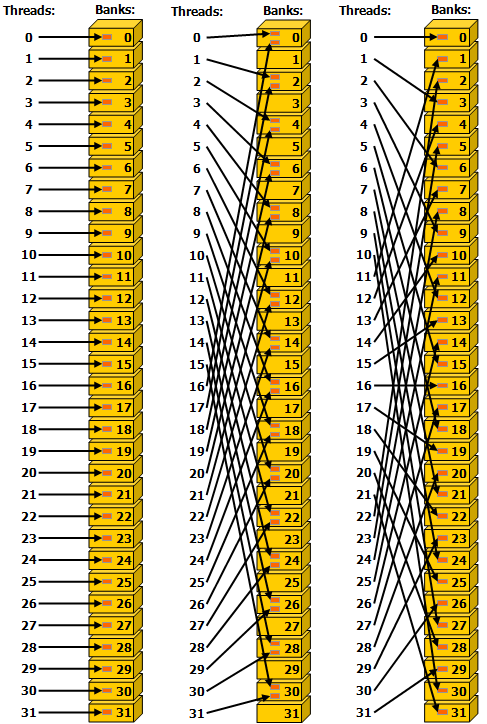
图 15:32-bit bank 模式下的步长访问。左:步长为一个 32-bit word,无冲突;中:步长为两个 word,产生二路 bank conflict;右:步长为三个 word,无冲突。
图 16 展示包含广播的读取。同一地址被多条箭头指向时,数据会广播给所有请求 thread。
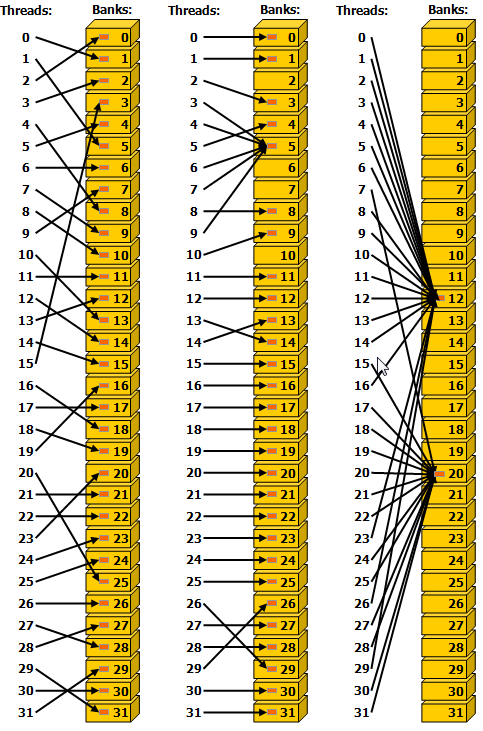
图 16:不规则 shared memory 访问。左:随机置换实现无冲突访问;中:thread 3、4、6、7、9 读取 bank 5 中同一个 word,因此无冲突;右:thread 读取各 bank 内的同一 word,通过广播避免冲突。
性能要点
使用 shared memory 的 kernel 应尽量避免 bank conflict。
2.3.4.2.1 使用 Shared Memory 的矩阵转置
前面的 矩阵转置 功能正确,但写入 c 时没有合并。下面将 shared memory 当作用户管理的 cache,暂存 global memory 的 load/store,使读写都能合并。
C++:
#define THREADS_PER_BLOCK_X 32
#define THREADS_PER_BLOCK_Y 32
/* macro to index a 1D memory array with 2D indices in column-major order */
/* ld is the leading dimension, i.e. the number of rows in the matrix */
#define INDX( row, col, ld ) ( ( (col) * (ld) ) + (row) )
/* CUDA kernel for shared memory matrix transpose */
__global__ void smem_transpose(int m,
                                    float *a,
                                    float *c )
{
    /* declare a statically allocated shared memory array */
    __shared__ float smemArray[THREADS_PER_BLOCK_X][THREADS_PER_BLOCK_Y];
    /* determine my row and column indices for the error checking code */
    const int myRow = blockDim.x * blockIdx.x + threadIdx.x;
    const int myCol = blockDim.y * blockIdx.y + threadIdx.y;
    /* determine my row tile and column tile index */
    const int tileX = blockDim.x * blockIdx.x;
    const int tileY = blockDim.y * blockIdx.y;
    if( myRow < m && myCol < m )
    {
        /* read from global memory into shared memory array */
        smemArray[threadIdx.x][threadIdx.y] = a[INDX( tileX + threadIdx.x, tileY + threadIdx.y, m )];
    } /* end if */
    /* synchronize the threads in the thread block */
    __syncthreads();
    if( myRow < m && myCol < m )
    {
        /* write the result from shared memory to global memory */
        c[INDX( tileY + threadIdx.x, tileX + threadIdx.y, m )] = smemArray[threadIdx.y][threadIdx.x];
    } /* end if */
    return;
}
Python:
import numpy as np
from numba import cuda
import cupy as cp
## Matrix transpose kernel, one thread per matrix element launched with
## 2D thread block on 2D grid to match matrix size
## Stages input to shared memory
@cuda.jit
def smem_transpose(a, c):
    smemArray = cuda.shared.array(shape=(32, 32), dtype=np.float32)
    tile_col = cuda.blockDim.x * cuda.blockIdx.x
    tile_row = cuda.blockDim.y * cuda.blockIdx.y
    smemArray[(cuda.threadIdx.x, cuda.threadIdx.y)] = a[(tile_row + cuda.threadIdx.y, tile_col + cuda.threadIdx.x)]
    cuda.syncthreads()
    c[(tile_col + cuda.threadIdx.y, tile_row + cuda.threadIdx.x)] = smemArray[(cuda.threadIdx.y, cuda.threadIdx.x)]
核心优化是确保 global memory 的访问合并。每个 thread 先根据 block 索引计算 tileRow、tileCol。同一 block 的这两个值相同,代表当前 tile 的起始位置。
随后,将一个 32 × 32 tile 从 global memory 读入 shared memory。每个 block 含 32 个 warp,它们的执行顺序没有保证。
C++:
smemArray[threadIdx.x][threadIdx.y] = a[INDX( tileRow + threadIdx.y, tileCol + threadIdx.x, m )];Python:
smemArray[(cuda.threadIdx.x, cuda.threadIdx.y)] = a[(tile_row + cuda.threadIdx.y, tile_col + cuda.threadIdx.x)]threadIdx.x 出现在 INDX 的第二个参数,因此连续 thread 连续读取 a,实现完全合并。Python 将 cuda.threadIdx.x 放在最后一维索引,效果相同。
之后的 __syncthreads() 或 cuda.syncthreads() 保证 block 内所有 thread 都完成前面的读入后才继续。这一步非常重要:后续 thread 将读取由其他 thread 写入 shared memory 的值。如果没有同步,某些 warp 可能在其他 warp 尚未完成写入前就开始读取。当 thread 使用自己没有加载的数据时,必须保证相应加载已经完成。
此时,shared memory 中保存了按原顺序排列的 32 × 32 tile。读取 smemArray 时交换 threadIdx.x、threadIdx.y,完成 tile 内转置;写入 c 时再交换 tileRow、tileCol,让 tile 出现在转置后的正确位置。同时仍让 threadIdx.x 对应最后一维,以保持 global memory 合并访问。
C++:
c[INDX( tileCol + threadIdx.y, tileRow + threadIdx.x, m )] = smemArray[threadIdx.y][threadIdx.x];Python:
c[(tile_col + cuda.threadIdx.y, tile_row + cuda.threadIdx.x)] = smemArray[(cuda.threadIdx.y, cuda.threadIdx.x)]本例体现 shared memory 的两个典型用途:暂存 global memory 数据以合并读写,以及让同一 block 的 thread 交换数据。
2.3.4.2.2 Shared Memory bank conflict
前面的例子优化了 global memory 访问,但还需要检查 shared memory bank conflict。考虑下面的声明。
C++:
__shared__ float smemArray[32][32];Python:
from numba import cuda
import numpy as np
smemArray = cuda.shared.array(shape=(32,32), dtype=np.float32)
假设 block 为 32 × 32。同一个 warp 内 threadIdx.y 固定,threadIdx.x 从 0 到 31。
图 17 左侧,warp 0 访问 smemArray[0][0] 到 smemArray[31][0],即沿列读取。按行优先排列时,连续 thread 的地址相差 32 个元素,全部落到同一个 bank,产生 32 路冲突。
右侧访问 smemArray[0][0] 到 smemArray[0][31],即沿行读取,连续 thread 访问相邻地址,落在不同 bank,没有冲突。理想情况是同一 warp 各 thread 访问图中不同颜色的 bank。
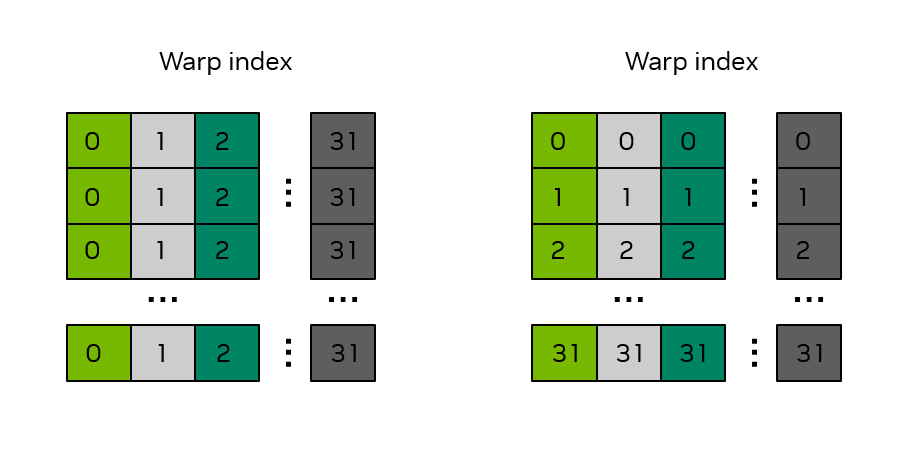
图 17:32 × 32 shared memory 数组中的 bank 分布。方框数字表示 warp 索引,颜色表示地址所属 bank。
回到 前面的优化示例,第一次使用 shared memory 是将 global memory 数据写入其中:
C++:
smemArray[threadIdx.x][threadIdx.y] = a[INDX( tileRow + threadIdx.y, tileCol + threadIdx.x, m )];Python:
smemArray[(cuda.threadIdx.x, cuda.threadIdx.y)] = a[(tile_row + cuda.threadIdx.y, tile_col + cuda.threadIdx.x)]这里 threadIdx.x 是 smemArray 的第一维,连续 thread 的 shared memory 地址步长为 32 个元素,因此出现图 17 左侧的 32 路冲突。
第二次使用 shared memory,是将其中数据写回 global memory:
C++:
c[INDX( tileCol + threadIdx.y, tileRow + threadIdx.x, m )] = smemArray[threadIdx.y][threadIdx.x];Python:
c[(tile_col + cuda.threadIdx.y, tile_row + cuda.threadIdx.x)] = smemArray[(cuda.threadIdx.y, cuda.threadIdx.x)]此时 threadIdx.x 在第二维,shared memory 地址步长为 1,对应右侧无冲突访问。
因此,这个 kernel 的两次 shared memory 访问,一次无冲突,一次有 32 路冲突。常用修复方法是给列维度增加一个元素作为 padding:
C++:
__shared__ float smemArray[THREADS_PER_BLOCK_X][THREADS_PER_BLOCK_Y+1];Python:
smemArray = cuda.shared.array(shape=(32, 32 + 1), dtype=np.float32)这项小改动即可消除冲突。图 18 将数组声明为 32 × 33 后,无论 warp 沿行还是沿列访问,各 thread 都访问不同颜色的 bank。
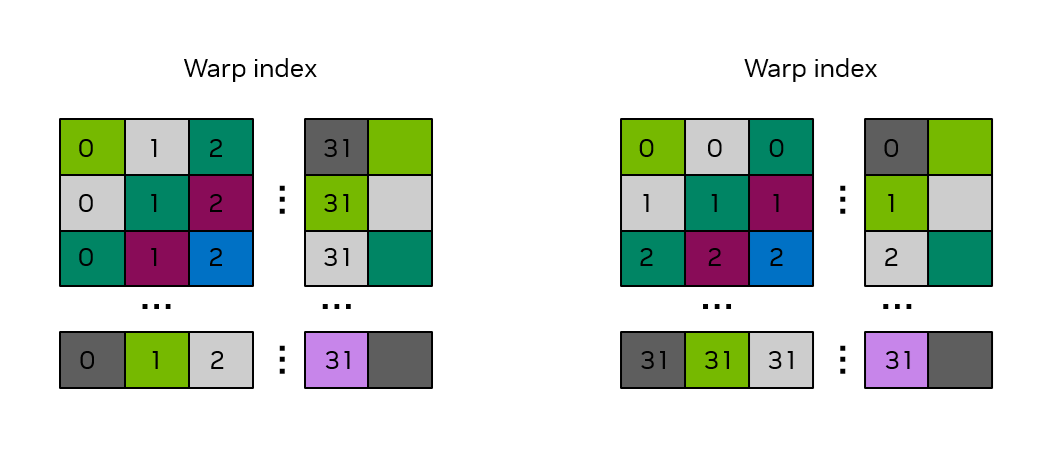
图 18:32 × 33 shared memory 数组中的 bank 分布。数字表示 warp 索引,颜色表示 bank;增加一列 padding 后,行访问和列访问均可避免冲突。
2.3.5 Atomic
高性能 kernel 需要尽量暴露算法并行性,使 thread 尽可能独立工作。但并非所有任务都能完全独立;如前所述,block 内 thread 可通过 shared memory 与同步交换数据。
普通 grid 不提供任意同步所有 thread 的机制,但 atomic 函数可以协调对特定 global memory 地址的访问,将 read-modify-write 作为不可分割的操作执行。原文用“对地址加锁后读取、修改、写回”的方式说明这种效果。
2.3.5.1 类似 C++ std::atomic 的操作
CUDA 提供 cuda::std::atomic、cuda::std::atomic_ref,语法与行为类似同名 C++ 标准库接口。扩展的 cuda::atomic、cuda::atomic_ref 还允许指定 thread scope。完整说明见 Atomic Functions。
下面用 cuda::atomic_ref 在 device 范围执行 atomic add:array 为浮点数组,result 指向保存总和的 global memory 位置。
__global__ void sumReduction(int n, float *array, float *result) {
...
tid = threadIdx.x + blockIdx.x * blockDim.x;
cuda::atomic_ref<float, cuda::thread_scope_device> result_ref(result);
result_ref.fetch_add(array[tid]);
...
}
应谨慎使用 atomic,因为协调 thread 访问可能影响性能。
2.3.5.2 Python 中的 memory atomic
Python 通过 numba.cuda.atomic 命名空间提供 GPU atomic 操作,例如 add、sub、max、min、compare_and_swap。完整支持列表参见 Numba CUDA 文档。
下面对数组所有元素求和。每个 block 将一段输入加载到 shared memory,再由 block 内单个 thread 求局部和,并原子累加到结果数组 s。由于数据位于接近 SM 计算资源的 shared memory,这种单 thread 局部累加在示例中仍可获得尚可的性能。
import numpy as np
from numba import cuda
import cupy as cp
@cuda.jit
def sum_reduce(a, s):
    ## create a shared array to support a block size up to 512 threads
    ## even though we'll use fewer in this example
    shared_staging = cuda.shared.array(shape=512, dtype=np.float32)
    ## Load values into shared memory and then synchronize to make sure all loads completed
    shared_staging[cuda.threadIdx.x] = a[cuda.blockIdx.x*cuda.blockDim.x + cuda.threadIdx.x]
    cuda.syncthreads()
    ## only thread 0 of each block does the local additions, followed by a single
    ## atomic operation per thread block
    local_sum = float(0.0)
    if cuda.threadIdx.x == 0:
        for i in range(cuda.blockDim.x):
            local_sum = local_sum + shared_staging[i]
        cuda.atomic.add(s, 0, local_sum)
array_length = 2**18
a = cp.ones(array_length)
s = cp.zeros(1, dtype=np.float32)
block_size = 256
grid_size = int(array_length/block_size)
sum_reduce[grid_size, block_size](a, s)
s_host = cp.asnumpy(s)
print(f"Sum is {int(s_host[0])}, expected {array_length}")
输入全为 1,因此正确结果等于 array_length。如果将:
cuda.atomic.add(s, 0, local_sum)替换为普通非原子加法:
s[0] = s[0] + local_sum对 s[0] 的更新会发生竞争,可能丢失部分累加,结果小于 array_length,而且可能随运行次数或 GPU 的 SM 数量变化。这说明 atomic 在此例中是正确性要求。
注意
本例演示功能,不是高性能 reduction 的推荐实现。NVIDIA CCCL 提供高度优化的 reduction 等原语,能兼顾开发效率与性能,适合时应优先使用。Python 中可通过 cuda.coop 使用相关原语。
C++ 也提供 传统 atomic 函数,但推荐优先采用类似 std::atomic 的接口。
2.3.6 Cooperative Groups
Cooperative Groups 是 CUDA C++ 中定义 thread group 的软件工具。group 内 thread 可以同步,分组能力能够跨越 block 等边界;原文还介绍了跨 grid、跨 GPU 的协作使用场景,具体支持范围及限制需结合相应 API。
基础 CUDA 模型可高效同步 block 或 cluster 内的 thread,但不直接表达更小的任意 group,也不为普通 block 间同步提供保证。Cooperative Groups 用软件接口补充这些能力,但跨越 block、cluster 边界时会有相应语义限制和性能影响,详见 Cooperative Groups。
2.3.7 kernel launch 与 occupancy
launch 时,execution configuration 确定 thread、block、grid 的组织。调度器再将 block 分配给 SM。应用程序不能控制或查询具体 block 被调度到哪个 SM,也没有顺序保证,因此正确性不能依赖特定调度顺序。
一个 SM 能同时驻留多少 block,取决于 block 的资源需求及 SM 的可用资源。launch 后,调度器不断分配 block;所有 SM 资源都不足以再接纳 block 时,就等待先前 block 完成,再继续分配,直到整个 grid 执行完毕。
通过 cudaGetDeviceProperties 查询以下限制,注意区分每个 SM 和每个 block 的上限。
| 属性 | 含义 |
|---|---|
maxBlocksPerMultiProcessor | 每个 SM 最大驻留 block 数 |
sharedMemPerMultiprocessor | 每个 SM shared memory 字节数 |
regsPerMultiprocessor | 每个 SM 的 32-bit register 数 |
maxThreadsPerMultiProcessor | 每个 SM 最大驻留 thread 数 |
sharedMemPerBlock | 每个 block 最大 shared memory 字节数 |
regsPerBlock | 每个 block 最大 32-bit register 数 |
maxThreadsPerBlock | 每个 block 最大 thread 数 |
Occupancy 是 SM 活跃 warp 数与硬件最大活跃 warp 数的比值。一般应争取足够高的 occupancy,以隐藏延迟并提高性能。
计算时,除了 SM 限制,还需要知道 kernel 的资源使用量。可在 nvcc 编译时添加 --resource-usage,查看 register 和 shared memory 用量。
表 2:SM 资源示例。
| 资源 | 数值 |
|---|---|
maxBlocksPerMultiProcessor | 32 |
sharedMemPerMultiprocessor | 233472 |
regsPerMultiprocessor | 65536 |
maxThreadsPerMultiProcessor | 2048 |
sharedMemPerBlock | 49152 |
regsPerBlock | 65536 |
maxThreadsPerBlock | 1024 |
按表中的示例资源,testKernel<<<512, 768>>>() 每个 block 768 个 thread,SM 最多同时驻留两个 block,因为三个会超过 2048 个 thread 上限。Occupancy 为 (768 × 2) / 2048 = 75%。
若改为 testKernel<<<512, 32>>>(),虽然 thread 上限尚未达到,但先触及每个 SM 最多 32 个 block 的限制。驻留 thread 数为 32 × 32 = 1024,occupancy 为 1024 / 2048 = 50%。
Shared memory 也可以成为限制。例如每个 block 使用 100 KB 时,示例 SM 只能同时容纳两个,因为三个需要 300 KB,超过 233472 字节的总量。
程序员能显式控制 block 大小和 shared memory 用量,并据此调整 occupancy。Register 用量主要由编译器与 runtime 优化;可用 --maxrregcount 施加限制,但 register 不足可能引发 local memory spilling。某些情况下,虽然发生 spilling,却因为更多 block 能同时驻留而提高 occupancy,最终仍可能获得净性能收益。